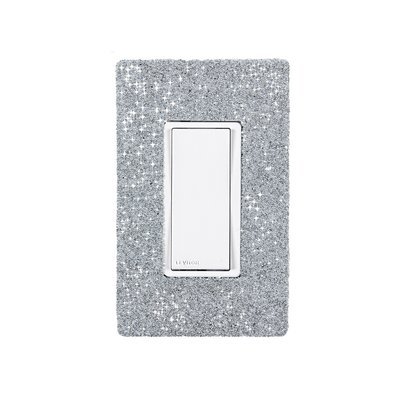
Hardwired WiFi Switch with Austrian Crystals and White Faceplate - Slate on White Wallplate
This support page provides publications, manuals, specifications, videos, support articles, and common support questions
Support Questions
Showing 10 of 11 questions
A WarmlyYours electric towel warmer can't be installed in a tub or shower enclosure. A WarmlyYours electric heated towel rack should be installed at least 24” away from a wet location like a shower, tub, etc. Always install a WarmlyYours electric towel warmer in compliance with all local building and electrical codes.
Yes. WarmlyYours towel warmers are to be installed in accordance with the instructions in the manual and CEC, NEC, and local code guidelines relating to electrical fixtures in bathrooms. A towel warmer with a hardwired connection must be on a GFCI-protected circuit and be wired by a professional who is certified to do electrical wiring. Towel warmer models with plug-in connections should be used with a GFCI outlet.
WarmlyYours towel warmers are all 120VAC units. Towel warmers are available in wattages from 35 watts all the way up to 250 watts. A single towel warmer would typically range from 1-2 amps based on the model. Wire size and breaker size need to be selected based on the total amperage of the towel warmer(s). For towel warmers installed in bathrooms, a GFCI breaker is required.
Yes — when the My Leviton app has a scheduled event programmed, that event will override any manual change at the time it fires.
For example: if the app is set to turn the towel warmer off at 9:00 AM and you manually turn it on at 8:50 AM, the app will switch it back off at 9:00 AM as programmed.
To keep your manual override in effect:
- Disable or delete the scheduled event in the My Leviton app before making your manual change, or
- Use the switch's physical button after the scheduled event fires — the switch will stay in the manually set state until the next scheduled event triggers.
This behavior applies to the Hardwired WiFi Switch (GK16-30090-0003) used with the My Leviton app.
A GFCI/GFEP (Ground Fault Circuit Interrupter / Ground Fault Equipment Protection) works differently than a circuit breaker by specifically detecting a small imbalance in electrical current between the hot and neutral wires, which indicates a potential ground fault (like a person touching a live wire), and instantly shutting off the power to prevent shock, while a circuit breaker only trips when there's a significant overload in current flow on the circuit, like a short circuit or too many appliances plugged in.
Yes, a regular (non-dimming) light switch can be used as an external switch to control a towel warmer, in addition to the built-in switch on the towel warmer itself.
However, do not use a dimmer switch — dimmer switches are not compatible with electric towel warmers and can damage the unit or create a safety hazard.
Note: A GFCI breaker powering the switch may be required by local Electrical Code.
If the Hardwired WiFi Switch (GK16-30090-0003) is switching your towel warmer off unexpectedly, work through these steps in order:
-
Check for hidden schedules or automations
In the My Leviton app, review all scheduled events, Scenes, and Rules — not just the main schedule. An automation rule (e.g., "turn off at sunset") can trigger the switch even if no timed schedule is visible. -
Update the switch firmware
Open My Leviton → Device Settings for the switch → check for a firmware update. Outdated firmware is a common cause of unscheduled switching behavior. -
Soft-reset the switch
Turn off the circuit breaker controlling the WiFi switch, wait 10 seconds, then turn it back on. This resets the switch without clearing your app settings. -
Factory reset and re-pair
If the issue persists: in My Leviton go to Device Settings → Remove Device, then re-add the switch from scratch. This clears all stored rules and schedules on the switch itself.
If none of these steps resolve the issue, contact WarmlyYours technical support at 1-800-875-5285 (available 24/7).
No, a circuit breaker will NOT protect against a power surge; a circuit breakers primary function is to protect against excessive current flow (overload), while a surge protector is specifically designed to handle voltage spikes, which are what power surges are considered to be.
A good starting point is to follow the recommendation often provided in the installation manual. The location of your electric towel warmer should take building code, safety, functionality, and aesthetics into consideration. If the towel warmer is mounted too low, towels may drag on the floor, causing tripping or mold issues. Mounting it higher reduces risk of burn, especially for children or those who may accidentally bump into it. If you are unsure what height is best for you, consult your WarmlyYours representative at +1 (800) 875-5285.
GFCI can fail for various reasons, such as wear and tear, moisture, corrosion, power surges, faulty wiring, or improper installation. Some of these causes can be prevented by regular inspection and maintenance, while others may require professional assistance. It is important to note that GFCI devices (ex. thermostat, breakers, outlets) should be tested regularly as these do wear out over time.
Documents
Sell Sheets
Publications
Specifications
Appearance (GK16-30090-0003-A)
| Color | White |
| Mounting Method | In-wall, single-gang box |
Electrical (GK16-30090-0003-A)
| Connection Method | Hardwired |
| Maximum Load (Resistive Only) | 15 A |
| Voltage | 120 V |
Product Dimensions (GK16-30090-0003-A)
| Depth | 1.77″ |
| Height | 4.66″ |
| Wallplate Depth | 0.218″ |
| Weight | 0.8 lbs |
| Width | 2.922″ |
Warranty / Certifications (GK16-30090-0003-A)
| FCC ID | 001-DW15S-1BZ |
| Warranty | 5-year limited warranty |
Identifiers (CACW-SC-SL-W)
| SKU | CACW-SC-SL-W |
Identifiers (GK16-30090-0003-A)
| SKU | GK16-30090-0003-A |
Connectivity (GK16-30090-0003-A)
| Voice Control | Works with Alexa, Google Assistant, Apple Home, SmartThings, and Matter support can be enabled with a firmware update via the My Leviton app |
| Wi-Fi IEEE Standards | 802.11 a/b/g/n |
| Wi-Fi Radio Frequency Bands | 2.4 GHz |
| Works with | Works with Alexa, Google Assistant, Apple Home, SmartThings, and Matter support can be enabled with a firmware update via the My Leviton app |
Product Dimensions (CACW-SC-SL-W)
| Weight | 0.75 lbs |
Videos
Articles
Similar Items
Do you need support or specifications for a specific model? Identify your model below.