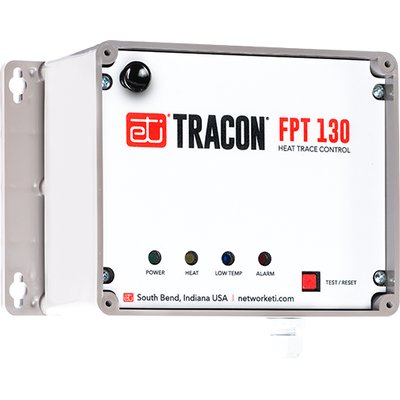
PRO-Tect: Pipe Freeze Protection Economy Control with GFEP
This support page provides publications, manuals, specifications, videos, support articles, and common support questions
Support Questions
Showing 10 of 16 questions
Unfortunately there's no set answer for this because it depends on many factors such as the diameter of the pipes, the installation density of the heating cables, the outdoor temperature, the installation of thermal insulation sleeves, etc.
There are too many variables to provide an accurate answer. Even though this product is designed to keep pipes from freezing, it is not designed to thaw pipes. If your pipe has frozen with the heat tape installed and energized, please check the placement of the built-in thermostat and verify that the insulation has been properly installed and waterproofed.
No. Only install pipe heat (heat trace cable) in accessible locations. Do not install this self regulating cable in walls or any place where the cable is hidden. Do not run it through walls, ceilings, or floors. The cable must be installed 10“ away from combustible surfaces, such as wood, and it should not be embedded in insulation or roofing material.
Do not wrap self regulating cable around the pipe in a coiled or spiral fashion, and do not use electric tape to attach it. WarmlyYours recommends attaching the cable in a straight run and to use aluminum or fiberglass tape, pipe straps, or plastic zip ties to attach the cable. Then cover the assembly with fire-resistant insulation and assure it is waterproof. Place electrical heating cable WARNING labels every 10‘, and where the label will be clearly visible.
- Hold down the red TEST/RESET pushbutton for approximately ten seconds.
- After the first five seconds the unit will go into Manual Mode, energizing the heater cable if it is not all ready energized.
– After the second five seconds the unit will enter the LOW TEMP blue LED edit mode. This is indicated by the blue LED flashing rapidly. Release the button at this point. (The unit will exit Manual Mode.).
Note: The blue LED may flash for a couple of seconds after releasing the red TEST/RESET pushbutton.
- The blue LED will indicate whether the LOW TEMP Alarm is currently disabled or not.
– If the blue LED remains on the LOW TEMP Alarm is currently enabled.
– If the blue LED goes off the LOW TEMP Alarm is currently disabled.
– To keep the setting as it is wait five seconds and the unit will resume normal operation.
– To change this setting press the red TEST/RESET pushbutton within five seconds. The new status of this setting will show for three seconds before the unit resumes normal operation.
Note: The blue LED will flash rapidly before exiting the LOW TEMP blue LED editing mode and resuming normal operation.
The PT-ECONOMY controller (FTP 130) includes a Low Current Alarm feature. This alarm switches the system off if it detects a load current below 0.1 amps, unless Fire Protection Mode is enabled. The system checks the load current during each ground fault test and whenever the load is active. When connecting a load through a relay panel, Fire Protection Mode can be enabled to avoid the alarm.
- POWER indicator – This green LED lit solid indicates that the FPT 130 (PT Economy) is receiving power.
– Blinking indicates a calibration error.
- HEAT indicator – This yellow LED lit solid indicates when the heater is energized.
– Blinking asymmetric (1/2 sec off × 1–1/2 sec on) : Low Current Alarm, heater relay closed.
– Blinking asymmetric (1/2 sec on × 1–1/2 sec off) : Low Current Alarm, heater relay open.
– Blinking fast : Stuck relay.
- LOW TEMP indicator – This blue LED lit solid indicates when the temperature falls to 32 °F (0 °C) for all set-points except the 30 °F (-1.1 °C) set-point. For the 30 °F (-1.1 °C) set-point the LOW TEMP alarm will indicate when the temperature drops to 28 °F (-2.2 °C).
– Blinking indicates sensor fault.
– Blinking fast indicates High Temperature alarm.
- ALARM indicator – This red LED lit solid indicates when there is a high ground fault current.
– Blinking indicates a GFEP circuit failure (this light will also blink while system is performing a self–test).
Documents
Technical Information
Sell Sheets
Installation
Operation Manuals
Specifications
Electrical
| Activation Temperature | 30 °F, 38 °F, 45 °F, 50 °F |
| Connection Method | Hardwired |
| Ground Fault Equipment Protection (GFEP) | Self-test GFEP 30mA |
| Maximum Load (Resistive Only) | 30 A |
| Voltage | 100 - 277 VAC |
Warranty / Certifications
| Approvals | UL and CSA listed |
| Area of Use | Non-hazardous locations |
| Ingress Protection (IPxx) Rating | IP66 |
| Warranty | 2 years |
| Waterproofing | NEMA 4X |
Product Dimensions
| Depth | 4.375″ |
| Height | 5.5″ |
| Installed Depth | 0.75″ |
| Weight | 3 lbs |
| Width | 8.125″ |
Identifiers
| SKU | PT-ECONOMY |
| UPC (GTIN-12) | 881308057169 |