
UWG5-4999-WY Frequently Asked Questions
Frequently Asked Questions
Showing 10 of 19 questions
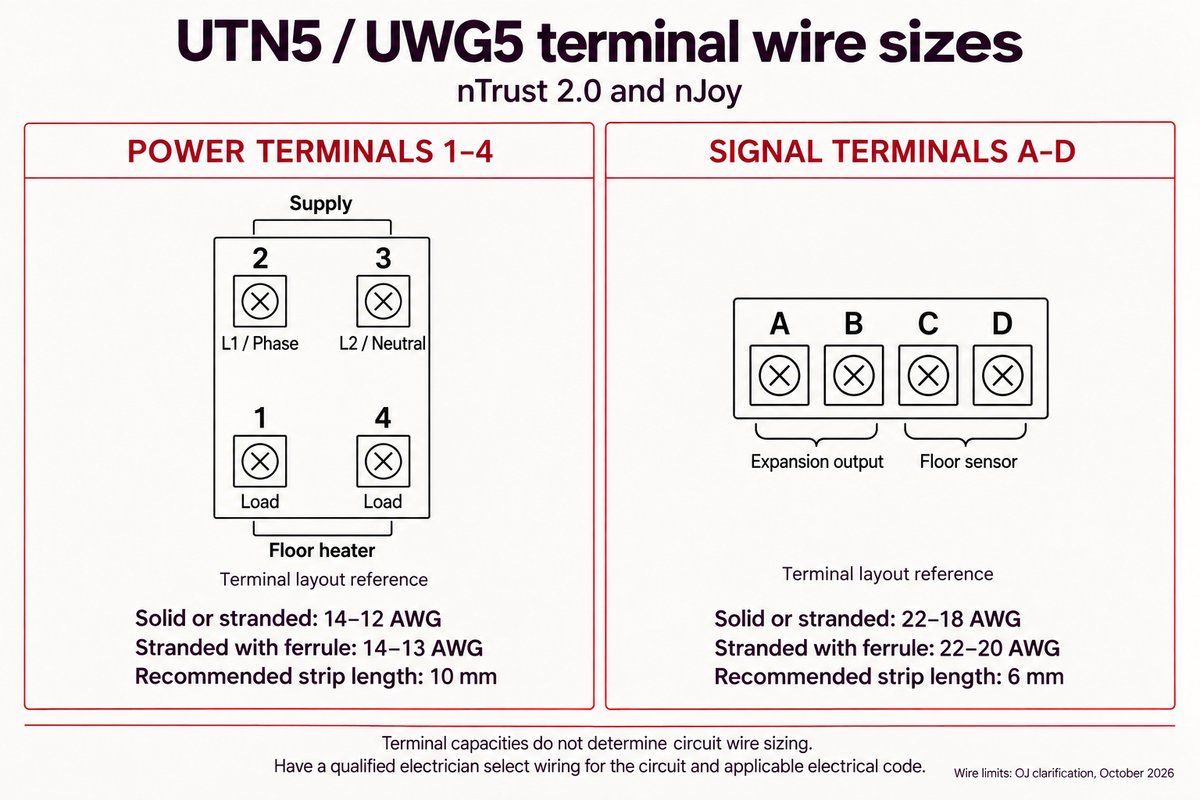
For nTrust 2.0 (UTN5) and nJoy (UWG5), power and signal terminals have different wire limits:
- Power terminals (1–4): 14–12 AWG solid or stranded wire; 14–13 AWG stranded wire with ferrules. Recommended strip length: 10 mm.
- Signal terminals (A–D): 22–18 AWG solid or stranded wire; 22–20 AWG stranded wire with ferrules. Recommended strip length: 6 mm.
These are terminal capacities, not circuit-sizing instructions. Have a qualified electrician select wiring for the circuit and applicable electrical code.
WarmlyYours's floor heating thermostats are typically universal and can be used with the majority of electric floor heating systems as a new or replacement controller. Please review the electrical specs of both the thermostat and the heating system to ensure a proper match for the heating system, sensor, etc. You can also give us a call at (1-800-875-5285) and we can help answer any remaining questions.
Yes — the nJoy WiFi (UWG5-4999) thermostat supports all three major smart home platforms:
- Amazon Alexa — use voice commands to set temperature or turn the system on and off.
- Google Home / Google Assistant — integrates with Google Home routines and Nest displays.
- Apple HomeKit — manage your floor heating from the Apple Home app and Siri.
The nJoy also works with the dedicated nJoy app (iOS and Android), which gives you full remote control including scheduling, temperature adjustments, and energy usage history from anywhere.
The nHance (UDG4-4999) and nTrust (UTN5-4999) thermostats are not WiFi-enabled and do not integrate with smart home platforms. They must be controlled locally at the wall unit.
Download the nJoy UWG5 app and ensure Bluetooth is enabled on your phone. Open the app, tap "Get Connected," and follow the on-screen instructions to complete the setup.
Note: The thermostat will not appear in your phone’s Bluetooth device list. Use the nJoy UWG5 app to complete the connection.
To completely power off the thermostat, turn off the circuit breaker controlling the thermostat.
Alternatively, put the thermostat into Standby/Frost Protection mode by pressing the lower right button once. A Standby icon will show for a few seconds before it fades out. The thermostat is now in standby. To exit standby, press the lower right button for a moment.
WarmlyYours offers three current thermostat lines for electric floor heating, each suited to different budgets and feature needs:
- nJoy WiFi (UWG5-4999) — The flagship smart thermostat. Connects to your home WiFi and is controlled via the nJoy app (iOS / Android), Amazon Alexa, Google Home, and Apple HomeKit. Features a full-colour touchscreen, 7-day programmable schedule, floor and air sensor support, and built-in GFCI protection. Best for homeowners who want remote access and smart home integration.
- nHance (UDG4-4999) — A premium non-WiFi programmable thermostat with a large colour touchscreen. Supports a 7-day schedule, floor and air sensor, and GFCI protection. Best for those who want a high-quality display and programmable scheduling without a WiFi requirement.
- nTrust (UTN5-4999) — A straightforward non-programmable thermostat for simple manual control. Compact form factor, supports a floor sensor, and includes GFCI protection. Best for secondary rooms, rental units, or anyone who prefers simple set-and-forget control.
All three thermostats are compatible with every WarmlyYours electric floor heating system (TempZone, Environ, and Slab Heat products). If you need help choosing, our radiant experts can recommend the right model for your project at no charge.
The early start (also called adaptive start) feature allows a programmable floor heating thermostat to automatically begin heating before your scheduled "comfort on" time, so the floor reaches your desired temperature precisely when you need it — not after a warm-up delay.
For example, if you schedule your floor to be warm at 7:00 AM and the system typically takes 45 minutes to reach temperature, the thermostat with early start will automatically begin heating at 6:15 AM.
Over time, the thermostat learns the thermal characteristics of your floor (the flooring material, the thickness of the installation, and the starting temperature) and continuously refines the lead time for increasingly accurate scheduling.
The nJoy WiFi (UWG5-4999) and nHance (UDG4-4999) thermostats support early start as part of their 7-day programmable schedule. The nTrust (UTN5-4999) is a non-programmable thermostat and does not have this feature.
The breaker and wire sizes are selected based on the total amperage of the WarmlyYours heating system connected to a single thermostat. This information is on the WarmlyYours heating system's installation plan, electrical plan, or UL label. Based on guidelines from the National Electrical Code: loads up to 16 Amps may utilize 12 gauge wire with a 20-Amp breaker, and loads up to 12 Amps - 14 gauge wire with a 15-Amp breaker. Local code and/or other factors may change these guidelines.
No, floor heating thermostats are not compatible with the towel warmers. We would also not recommend using both devices on the same control, as it does not take the same amount of time to reach the ideal temperature for each product, which could lead to one unit to overheat and the other to not function properly.
One thermostat can control multiple heating mats/cables as long as all the heating elements are using less than 15 amps:
TempZone™ will cover aprx. 120 sq. ft. for 120V systems and 240 sq. ft. for 240V systems on one thermostat.
Environ™ will cover aprx. 150 sq. ft. for 120V systems and 300 sq. ft. for 240V systems on one thermostat.
Slab Heat will cover aprx. 90 sq. ft. for 120V systems and 180 sq. ft. for 240V systems on one thermostat.
In most cases, yes — a dedicated circuit is strongly recommended and often required by local electrical codes. Here is why:
- Electric floor heating draws a continuous load (typically 80% of the circuit's rated amperage for NEC compliance). Adding other devices to the same circuit risks overloading it.
- Most WarmlyYours thermostats are rated for 15A at 120V or 15A at 240V. A dedicated 15A or 20A circuit — matched to the system voltage — provides safe headroom.
- GFCI protection is required by the NEC for all electric floor heating systems. WarmlyYours thermostats include built-in Class A GFCI, so an external GFCI outlet or breaker is not needed when using these models.
Always consult a licensed electrician and verify your local code requirements before installation. Our free design service includes circuit and load calculations for your specific system.
Use a floor sensor (included with most WarmlyYours kits) to prevent overheating, especially with temperature-sensitive floors like hardwood, laminate, and LVT. If using the nJoy WiFi or nHance thermostat, you can use the built-in air sensor or a combination of floor and air sensors. The nTrust thermostat only supports a floor sensor. Always use a floor sensor with hardwood, laminate, or LVT to respect the floor's maximum temperature limit (usually 80–85°F / 27–29°C).
WarmlyYours floor heating systems are backed by our industry-leading warranties, among the longest in the radiant heating industry:
Product Warranties:
- TempZone™ systems – 25-year product warranty on heating cables and mats
- Environ™ systems – 25-year product warranty on heating cables and mats
- Thermostats – 3-year manufacturer warranty on all models
- Installation materials – Covered under respective product warranties
What's Covered:
- Manufacturing defects in heating cables, mats, and components
- Free replacement of defective products during warranty period
- Technical support for troubleshooting and diagnostics
- Installation guidance to prevent issues before they occur
Why Our Warranty Matters:
- Proven reliability – Over 25 years of manufacturing experience
- Rigorous testing – Every system tested before shipping
- Quality materials – Premium components designed for decades of service
- Installation support – 24/7 tech support during installation to prevent warranty issues
- Peace of mind – Your investment is protected for decades
Warranty Registration:
Your SmartPlan™ includes warranty documentation and testing logs. We recommend:
- Testing resistance before, during, and after installation
- Documenting all resistance readings
- Taking photos of your installation
- Registering your system online after installation
Beyond the Warranty:
Even after your warranty period, our support team remains available to help with:
- Troubleshooting and diagnostics
- System expansions to additional rooms
- Replacement thermostats and accessories
- Technical guidance for any issues
Your SmartPlan™ ensures your system is properly designed and installed from day one, minimizing the chance of issues and maximizing the life of your investment.
A floor sensor measures floor temperature so a compatible thermostat can regulate comfort and enforce the flooring manufacturer’s temperature limit. Some thermostats, including nTrust 2.0, offer a regulator mode without a sensor, but that mode does not measure floor temperature. Use sensor-based temperature control whenever required by the flooring or heating-system instructions.
