
How to Change Settings on the nTrust 2.0 Thermostat
Master Your Thermostat’s Settings in Minutes
Learn how to customize the display settings on your nTrust 2 Thermostat in this step-by-step video. Press and hold the thermostat screen for three seconds to access the menu options. Adjust key settings like actual temperature, setpoint temperature, screen brightness, flooring type, and more. Plus, we’ll guide you through the process of resetting your thermostat for a fresh start.
Related Resources
-
Product · UTN5-4999
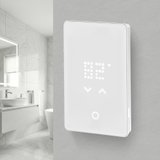
nTrust 2.0 Touch Nonprogrammable Thermostat
Enjoy the comfort of radiant heating with effortless control using the newly updated nTrust 2.0 Nonprogrammable Thermostat. Designed for ease and dependability, this thermostat ...
Need Help with Your Project?
Our team of Radiant Experts are ready to help! Contact us about your project to get started.
Contact Us About Your Project