
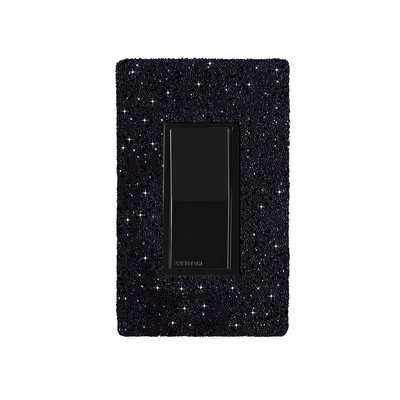
Hardwired WiFi Switch with Austrian Crystals and Black Faceplate - Midnight on Black Wallplate
This support page provides publications, manuals, specifications, videos, support articles, and common support questions
Notices
Quebec Repairability Notice
Avis important pour les consommateurs du Québec:
WarmlyYours ne fournit ni services de réparation ni pièces de rechange pour ce produit. Si votre thermostat de chauffage de sol intérieur tombe en panne pendant la période de garantie, nous remplacerons l'unité complète conformément à notre politique de garantie. Notre équipe de soutien technique est disponible par téléphone 24h/24 et 7j/7 pour l'assistance à l'installation et au dépannage. Pour tous les détails, veuillez consulter notre Politique de Retour. Cet avis est fourni conformément à l'article 39 de la Loi sur la protection du consommateur du Québec (telle que modifiée en 2025).
Important Notice for Québec Consumers:
WarmlyYours does not provide repair services or replacement parts for this product. If your indoor floor heating thermostat fails within the warranty period, we will replace the entire unit according to our warranty policy. Our technical support team is available 24/7 by phone for installation and troubleshooting assistance. For full details, see our Return Policy. This notice is provided in accordance with Québec’s Consumer Protection Act, section 39 (as amended in 2025).
Support Questions
Showing all 6 questions
Yes — when the My Leviton app has a scheduled event programmed, that event will override any manual change at the time it fires.
For example: if the app is set to turn the towel warmer off at 9:00 AM and you manually turn it on at 8:50 AM, the app will switch it back off at 9:00 AM as programmed.
To keep your manual override in effect:
- Disable or delete the scheduled event in the My Leviton app before making your manual change, or
- Use the switch's physical button after the scheduled event fires — the switch will stay in the manually set state until the next scheduled event triggers.
This behavior applies to the Hardwired WiFi Switch (GK16-30090-0003) used with the My Leviton app.
A GFCI/GFEP (Ground Fault Circuit Interrupter / Ground Fault Equipment Protection) works differently than a circuit breaker by specifically detecting a small imbalance in electrical current between the hot and neutral wires, which indicates a potential ground fault (like a person touching a live wire), and instantly shutting off the power to prevent shock, while a circuit breaker only trips when there's a significant overload in current flow on the circuit, like a short circuit or too many appliances plugged in.
If the Hardwired WiFi Switch (GK16-30090-0003) is switching your towel warmer off unexpectedly, work through these steps in order:
-
Check for hidden schedules or automations
In the My Leviton app, review all scheduled events, Scenes, and Rules — not just the main schedule. An automation rule (e.g., "turn off at sunset") can trigger the switch even if no timed schedule is visible. -
Update the switch firmware
Open My Leviton → Device Settings for the switch → check for a firmware update. Outdated firmware is a common cause of unscheduled switching behavior. -
Soft-reset the switch
Turn off the circuit breaker controlling the WiFi switch, wait 10 seconds, then turn it back on. This resets the switch without clearing your app settings. -
Factory reset and re-pair
If the issue persists: in My Leviton go to Device Settings → Remove Device, then re-add the switch from scratch. This clears all stored rules and schedules on the switch itself.
If none of these steps resolve the issue, contact WarmlyYours technical support at 1-800-875-5285 (available 24/7).
No, a circuit breaker will NOT protect against a power surge; a circuit breakers primary function is to protect against excessive current flow (overload), while a surge protector is specifically designed to handle voltage spikes, which are what power surges are considered to be.
GFCI can fail for various reasons, such as wear and tear, moisture, corrosion, power surges, faulty wiring, or improper installation. Some of these causes can be prevented by regular inspection and maintenance, while others may require professional assistance. It is important to note that GFCI devices (ex. thermostat, breakers, outlets) should be tested regularly as these do wear out over time.
Documents
Sell Sheets
Installation
Publications
Specifications
Installation (GK16-30090-0003-A)
Appearance (GK16-30090-0003-A)
| Color | White |
| Mounting Method | In-wall, single-gang box |
Electrical (GK16-30090-0003-A)
| Connection Method | Hardwired |
| Frequency | 60 Hz |
| Load Ratings | D315S: 15 A general use; 3 A LED/CFL; 1/3 HP motor. |
| Maximum Load Resistive Only | 15 A |
| Power Source Type | Corded Electric |
| Voltage | 120 V |
Connectivity (GK16-30090-0003-A)
Product Dimensions (GK16-30090-0003-A)
| Control Body Depth | 1.09″ |
| Depth | 1.77″ |
| Height | 4.66″ |
| Wallplate Depth | 0.218″ |
| Weight | 0.8 lbs |
| Width | 2.92″ |
Control (GK16-30090-0003-A)
Environmental (GK16-30090-0003-A)
| Lower Temperature Rating | 0 °C |
| Operating Humidity | 10–90% RH, non-condensing |
| Upper Temperature Rating | 40 °C |
Warranty (GK16-30090-0003-A)
| Manufacturer Warranty | D315S: 1-year limited manufacturer warranty; WarmlyYours product warranty is listed separately. |
Identifiers (GK16-30090-0003-A)
| SKU | GK16-30090-0003-A |
Identifiers (CACW-SC-MD-B)
| SKU | CACW-SC-MD-B |
Warranty / Certifications (GK16-30090-0003-A)
| Warranty | 5-year limited warranty |
Product Dimensions (CACW-SC-MD-B)
| Weight | 0.75 lbs |


