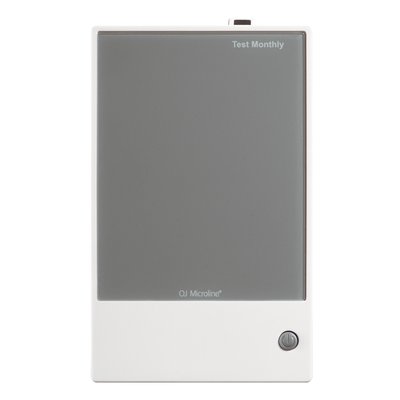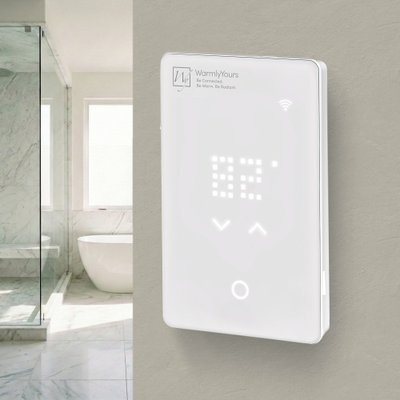
nJoy WiFi LED Touch Programmable Thermostat (UWG5-4999-WY)
Part Number: UWG5-4999-WY
This support page provides publications, manuals, specifications, videos, support articles, and common support questions
This support page provides publications, manuals, specifications, videos, support articles, and common support questions


Jump to
Notices
Quebec Repairability Notice
Avis important pour les consommateurs du Québec:
WarmlyYours ne fournit ni services de réparation ni pièces de rechange pour ce produit. Si votre thermostat de chauffage de sol intérieur tombe en panne pendant la période de garantie, nous remplacerons l'unité complète conformément à notre politique de garantie. Notre équipe de soutien technique est disponible par téléphone 24h/24 et 7j/7 pour l'assistance à l'installation et au dépannage. Pour tous les détails, veuillez consulter notre Politique de Retour. Cet avis est fourni conformément à l'article 39 de la Loi sur la protection du consommateur du Québec (telle que modifiée en 2025).
Important Notice for Québec Consumers:
WarmlyYours does not provide repair services or replacement parts for this product. If your indoor floor heating thermostat fails within the warranty period, we will replace the entire unit according to our warranty policy. Our technical support team is available 24/7 by phone for installation and troubleshooting assistance. For full details, see our Return Policy. This notice is provided in accordance with Québec’s Consumer Protection Act, section 39 (as amended in 2025).
Support Questions
Showing 10 of 30 questions
The breaker and wire sizes are selected based on the total amperage of the WarmlyYours heating system connected to a single thermostat. This information is on the WarmlyYours heating system's installation plan, electrical plan, or UL label. Based on guidelines from the National Electrical Code: loads up to 16 Amps may utilize 12 gauge wire with a 20-Amp breaker, and loads up to 12 Amps - 14 gauge wire with a 15-Amp breaker. Local code and/or other factors may change these guidelines.
One thermostat can control multiple heating mats/cables as long as all the heating elements are using less than 15 amps:
TempZone™ will cover aprx. 120 sq. ft. for 120V systems and 240 sq. ft. for 240V systems on one thermostat.
Environ™ will cover aprx. 150 sq. ft. for 120V systems and 300 sq. ft. for 240V systems on one thermostat.
Slab Heat will cover aprx. 90 sq. ft. for 120V systems and 180 sq. ft. for 240V systems on one thermostat.
In theory, it is possible, if no other options are available. We do not recommend it, but If the thermostat is controlling the floor temperature with a floor sensor, then it can go on an exterior wall. It is important that the floor sensor gets located in an area of the floor not hit by sunshine.
If the thermostat will be controlling the air temperature with the built-in ambient sensor, then it should go on an interior wall.
A GFCI/GFEP (Ground Fault Circuit Interrupter / Ground Fault Equipment Protection) works differently than a circuit breaker by specifically detecting a small imbalance in electrical current between the hot and neutral wires, which indicates a potential ground fault (like a person touching a live wire), and instantly shutting off the power to prevent shock, while a circuit breaker only trips when there's a significant overload in current flow on the circuit, like a short circuit or too many appliances plugged in.
Relays can fail due to excessive current or voltage. When a relay is exposed to too much current, the contacts can burn out. High voltage can also damage the coil. Other reasons include mechanical wear and tear, dust or dirt buildup, and moisture. These factors can cause the relay to malfunction or stop working entirely. Regular maintenance and using the relay within its specified limits can help prevent failures.
The flashing digits indicate that the actual (measured) floor temperature exceeds the thermostat temperature limit.
The temperature limit is set for either tile (104°F/40°C) or laminate (82°F/28°C) when the thermostat is first set up or re-configured.
For example: When the floor type (protection) is set to laminate, the limit defaults to 82°F/28°C. If the floor temperature goes above this - whether due to radiant floor heating or external heating sources, then the digits will flash and the heating is switched off.
Turning the temperature up or down will not affect the flashing digits. And leaving the thermostat alone with flashing digits does not harm the system.
Tip: To turn off the heated floor (ex. for months when it is not needed), on the outer edge of the thermostat, depress the lower right side button for 3-5 seconds. This will also turn it back on.
- Go into the nJoy App.
- Connect with Bluetooth.
- For the desired thermostat, select the blue settings wheel in the upper right corner.
- Select 'Manage Thermostat'.
- Navigate down to 'Wi-Fi Settings'.
- Select the blue bar at the bottom of the screen 'Change Wi-Fi Settings'.
- Identify your WiFi network and 'Connect Manually'.
- Enter that WiFi network's credentials (userid & password).
No separate GFCI breaker is required — every WarmlyYours thermostat has a built-in Class A (5mA) GFCI. Stacking a GFCI breaker on top of it is one of the most common causes of nuisance tripping. Run a dedicated breaker sized to the load at 80% continuous duty: a 15A circuit carries up to 1,440W at 120V, a 20A circuit up to 1,920W. Loads beyond the thermostat’s 15A rating need a power module or relay.
Turn the power (circuit breaker typically) to the thermostat off for 5 minutes and then back on to reset the thermostat.
If there is power to the thermostat and it still doesn't appear to work, then the next step toward a solution is to take Ohm measurements of the floor heating system.
This is done with a digital multi-meter that can select a low 200 Ohm (Ω) scale. To conduct this test, turn off the circuit breaker. Remove the thermostat completely from the wall and disconnect the wires connected to the LOAD connections at the back of the thermostat. Disconnect the ground wires from the house ground, and do the test shown on the links below. If you are uncomfortable doing this test, contact a qualified electrician.
Please follow one of these guides based on the type of heating system installed:
For a quick overview of the testing process:
Here is a video showing how the test is done
Here is a video showing how to locate and identify the floor heating wires
If the system still does not function, contact +1 (800) 875-5285 WarmlyYours Technical Support and provide the Ohm measurements for further assistance.
Download the nJoy UWG5 app and ensure Bluetooth is enabled on your phone. Open the app, tap "Get Connected," and follow the on-screen instructions to complete the setup.
Note: The thermostat will not appear in your phone’s Bluetooth device list. Use the nJoy UWG5 app to complete the connection.
To completely power off the thermostat, turn off the circuit breaker controlling the thermostat.
Alternatively, put the thermostat into Standby/Frost Protection mode by pressing the lower right button once. A Standby icon will show for a few seconds before it fades out. The thermostat is now in standby. To exit standby, press the lower right button for a moment.
Check these common causes:
- Trapped heat: a heavy or rubber-backed rug or furniture over the sensor makes it read high. Move the item.
- Two sensors connected: disconnect the extra sensor and leave one pair of wires on terminals C+D.
- Changed calibration: this setting should never be changed. Do a factory reset (Installer and User resets).
- Older system: some older systems, especially those with an OJ Dual/Energystat thermostat, used 12kΩ sensors. Change the installer setting from the default 10kΩ to 12kΩ.
Need more help? Contact WarmlyYours technical support.
WarmlyYours controllers incorporate built-in Class A GFCI protection for all new floor heating systems. Class A GFCI provides personnel protection and trips when ground fault current exceeds 5 mA (milliamps). Class B GFCI protection is pretty much obsolete, but older systems may still require it. WarmlyYours controllers with built-in Class B GFCI provide equipment and circuit protection and operates when a fault to ground exceeds 15 mA.
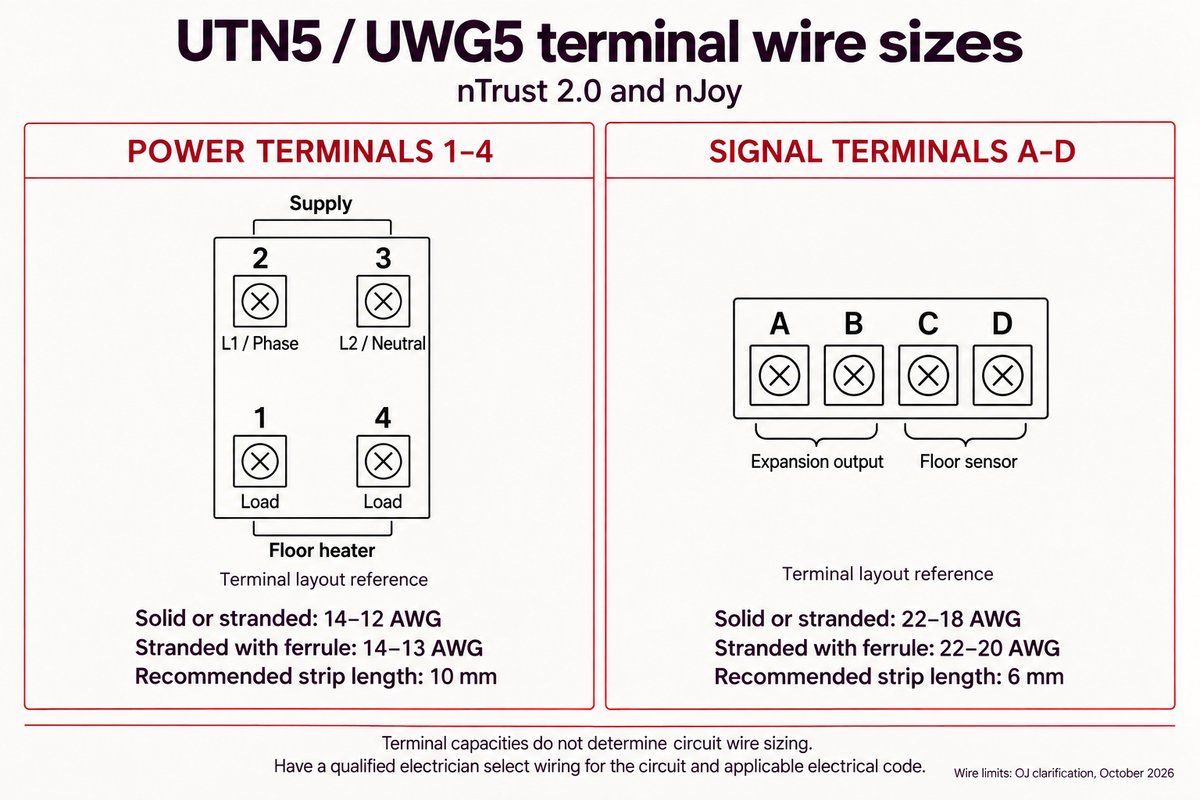
For nTrust 2.0 (UTN5) and nJoy (UWG5), power and signal terminals have different wire limits:
- Power terminals (1–4): 14–12 AWG solid or stranded wire; 14–13 AWG stranded wire with ferrules. Recommended strip length: 10 mm.
- Signal terminals (A–D): 22–18 AWG solid or stranded wire; 22–20 AWG stranded wire with ferrules. Recommended strip length: 6 mm.
These are terminal capacities, not circuit-sizing instructions. Have a qualified electrician select wiring for the circuit and applicable electrical code.
GFCI can fail for various reasons, such as wear and tear, moisture, corrosion, power surges, faulty wiring, or improper installation. Some of these causes can be prevented by regular inspection and maintenance, while others may require professional assistance. It is important to note that GFCI devices (ex. thermostat, breakers, outlets) should be tested regularly as these do wear out over time.
A floor sensor measures floor temperature so a compatible thermostat can regulate comfort and enforce the flooring manufacturer’s temperature limit. Some thermostats, including nTrust 2.0, offer a regulator mode without a sensor, but that mode does not measure floor temperature. Use sensor-based temperature control whenever required by the flooring or heating-system instructions.
The nJoy App software update is made available by OJ Microline and is controlled by the device's Google Play or Apple App stores.
Some people prefer to let the system handle the nJoy App update process automatically. Others prefer to disable automatic nJoy App update and do it themselves. If there is an update available in the App Store/Google Play, an update can be invoked from there buy the user. If there is no update available, then the nJoy App is current (up-to-date).
Apple SEP2025 Info: https://support.apple.com/en-us/102629
Google SEP2025 Info: https://support.google.com/googleplay/answer/113412?hl=en
There are a couple of methods to ensure your thermostat schedule is off.
1.) Physically at the thermostat; press the temperature area of the screen for 3 seconds. It will scroll a message confirming this action and you will no longer see the schedule on the screen of the LED thermostat.
2.) Remotely on the nJoy app; note that this only works when connected via WiFi (not bluetooth), there is a schedule icon in the blue tile representing your thermostat. Select your thermostat and on the next screen below the temperature is ACTIVATE + STANDBY, select ACTIVE to change this. Then either slide the window down or go to Schedules after deactivating, in order to exit that screen. Note that this option does not show in 'Schedules' and that a default schedule must always exist (even if turned off).
Documents
Operation Manuals
- nJoy WiFi LED Touch Thermostat User Manual (English)
- nJoy WiFi LED Touch Thermostat User Manual (French)
- nJoy WiFi LED Touch Thermostat User Manual (Spanish)
Wiring Diagrams
- nSpiration Series Thermostat Wiring Diagram (120V & 240V) (English)
- Wiring Diagram for 120V & 240V Floor Heating Products with Relay with Thermostat (English)
Installation
- nJoy Startup Guide UWG5-4999-WY (English, French)
- Connecting the nJoy Thermostat with a Mobile Device (English)
- Setting Up the nJoy UWG5-4999 without an App (English)
- nJoy Startup Guide UWG5-4999-WY (English, Spanish)
- nSpiration Series Rough-in Kit-03 installation (2 conduits)
- nSpiration Electrical Rough-in Kit Installation (Single Gang Box with Single Conduit) (English)
- nSpiration Series Rough-in Kit-01 Installation (no conduit)
Technical Support
Technical Information
Sell Sheets
Specifications
Controls
| App Languages | English, French, Spanish |
Warranty / Certifications
Electrical
Connectivity
| Bluetooth® | Version 4.2 (BDR/EDR/BLE) |
| Security | TLS 1.3 |
| Wi-Fi IEEE Standards | 802.11 b/g/n |
| Wi-Fi Radio Frequency Bands | 2.4 GHz |
| WiFi Encryption | WPA, WPA2, WPA3 |
| Works with | Hey Google or Amazon Alexa |
Appearance
| Color | White Acrylic |
| Display | LED Light Through |
Product Dimensions
| Depth | 1.73″ |
| Installed Depth | 0.46″ |
| Length | 4.98″ |
| Weight | 0.4 lbs |
| Width | 3.09″ |
Thermostat
| Floor Sensor Compatibility | 10k ohms, 12k ohms and custom |
| Includes Floor Sensor | 10k ohms, 15′ lead |
| Maximum Ambient Temperature Setting | 77 °F |
| Maximum Floor Temperature Setting | 104 °F |
| Minimum Ambient Temperature Setting | 32 °F |
| Minimum Floor Temperature Setting | 41 °F |
Identifiers
| SKU | UWG5-4999-WY |
| UPC (GTIN-12) | 881308076771 |
Videos
Articles
- Choosing wood flooring for electric radiant heating
- Electric radiant heat under LVT, vinyl and resilient flooring
- ETI Floorstat FWT-3: operation and replacement considerations
- Extending floor-heater cold leads and sensor wiring
- Finding LVT products compatible with electric floor heating
- Floor heating and implanted pacemakers: checking compatibility
- FLOR carpet tiles over radiant floor heating
- How to assign an existing schedule to a zone in the nJoy app
- How to reduce winter gaps in wood flooring
- nJoy display shows the setpoint instead of the current temperature
- nJoy E2 error when no floor sensor is installed
- nJoy: E8 WiFi router error
- nJoy: Floor protection and standby heating
- nJoy: Restore Bluetooth pairing on an iPhone
- nJoy thermostat error codes
- nJoy thermostat indicator lights
- nJoy: Troubleshoot WiFi and Bluetooth connections
- Pair an nJoy thermostat with an iPhone
- Set up an nJoy thermostat without the app
- Thermostat red light: Identify the model and message first
- Use a heating schedule on an nJoy thermostat
- Using the built-in schedule on an nJoy thermostat
- View thermostats and zones in the nJoy app
Related Items
Do you need support or specifications for a specific model? Identify your model below.