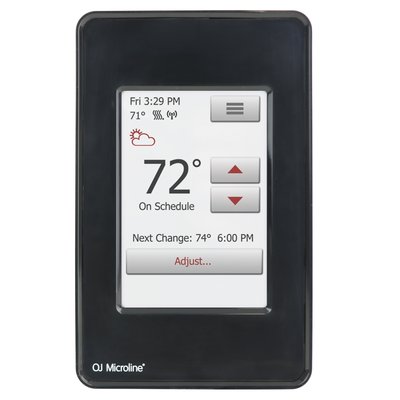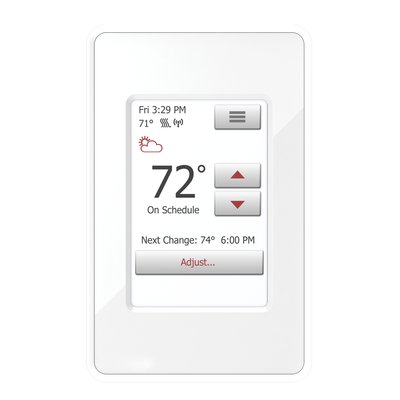
nSpire Touch WiFi Programmable Thermostat (White) (UWG4-4999-MN)
Part Number: UWG4-4999-MNPast Model
It was replaced by the nJoy WiFi LED Touch Programmable Thermostat (UWG5-4999-WY).
The nSpire WiFi thermostat offers all the things you expect from a smart touchscreen thermostat – voice control (works with Hey Google and compatible with Amazon Alexa, adaptive control and intuitive operation.
This support page provides publications, manuals, specifications, videos, support articles, and common support questions
It was replaced by the nJoy WiFi LED Touch Programmable Thermostat (UWG5-4999-WY).
The nSpire WiFi thermostat offers all the things you expect from a smart touchscreen thermostat – voice control (works with Hey Google and compatible with Amazon Alexa, adaptive control and intuitive operation.
This support page provides publications, manuals, specifications, videos, support articles, and common support questions
Jump to
Support Questions
Showing 10 of 36 questions
The breaker and wire sizes are selected based on the total amperage of the WarmlyYours heating system connected to a single thermostat. This information is on the WarmlyYours heating system's installation plan, electrical plan, or UL label. Based on guidelines from the National Electrical Code: loads up to 16 Amps may utilize 12 gauge wire with a 20-Amp breaker, and loads up to 12 Amps - 14 gauge wire with a 15-Amp breaker. Local code and/or other factors may change these guidelines.
In theory, it is possible, if no other options are available. We do not recommend it, but If the thermostat is controlling the floor temperature with a floor sensor, then it can go on an exterior wall. It is important that the floor sensor gets located in an area of the floor not hit by sunshine.
If the thermostat will be controlling the air temperature with the built-in ambient sensor, then it should go on an interior wall.
A GFCI/GFEP (Ground Fault Circuit Interrupter / Ground Fault Equipment Protection) works differently than a circuit breaker by specifically detecting a small imbalance in electrical current between the hot and neutral wires, which indicates a potential ground fault (like a person touching a live wire), and instantly shutting off the power to prevent shock, while a circuit breaker only trips when there's a significant overload in current flow on the circuit, like a short circuit or too many appliances plugged in.
The default is 10k. If this is a new installation, that is the answer. In the very rare occasion that this is replacing an older Energy stat (eg. square OJ Microline from before 2010 with red and green sensor wires), choose 12k. If this is a replacement for the other 99% of the thermostats WarmlyYours sold (Honeywell TH115 and TH111 thermostats), 10k is the value.
Always start with the default 10kΩ and change later if needed.
Pressing and holding (2-3 sec) physical power/reset button will turn the unit completely OFF. Same process turns the unit back on.
(nHance and nJoin units will have the button on the front faceplate, nSpire Touch WiFi, nSpire Touch and nTrust will have the button on the right side of the faceplate.)
Relays can fail due to excessive current or voltage. When a relay is exposed to too much current, the contacts can burn out. High voltage can also damage the coil. Other reasons include mechanical wear and tear, dust or dirt buildup, and moisture. These factors can cause the relay to malfunction or stop working entirely. Regular maintenance and using the relay within its specified limits can help prevent failures.

No, a circuit breaker will NOT protect against a power surge; a circuit breakers primary function is to protect against excessive current flow (overload), while a surge protector is specifically designed to handle voltage spikes, which are what power surges are considered to be.
The flashing digits indicate that the actual (measured) floor temperature exceeds the thermostat temperature limit.
The temperature limit is set for either tile (104°F/40°C) or laminate (82°F/28°C) when the thermostat is first set up or re-configured.
For example: When the floor type (protection) is set to laminate, the limit defaults to 82°F/28°C. If the floor temperature goes above this - whether due to radiant floor heating or external heating sources, then the digits will flash and the heating is switched off.
Turning the temperature up or down will not affect the flashing digits. And leaving the thermostat alone with flashing digits does not harm the system.
Tip: To turn off the heated floor (ex. for months when it is not needed), on the outer edge of the thermostat, depress the lower right side button for 3-5 seconds. This will also turn it back on.
Yes, this model is dual-voltage and compatible with both 120V and 240V systems. However, ensure your supply voltage matches the voltage requirement of your specific floor heating element (e.g., do not connect 240V power to a 120V heating mat).
For a visual guide on these thermostats, you might find this video helpful:
... OJ Microline UWG4 and UDG4 Touch thermostats overview ...
This video details the features and installation concepts for the UWG4/AWG4 series, confirming its dual-voltage capabilities.
Yes. The floor never free-runs — the thermostat’s floor sensor governs output, and you set a maximum floor temperature limit in the thermostat itself. Most heated tile bathroom floors are set between 80°F and 85°F. Set that limit during commissioning and record it on the handoff sheet so the homeowner does not raise it past the flooring manufacturer’s rated maximum.
Yes, but the tear-out is the real risk. Scan the floor with thermal imaging before demo to map the existing hydronic tubing, and never fasten or drill into it. Keep the two systems on fully independent controls so they cannot fight each other, and do not place the electric floor sensor directly above a hydronic loop — the false-high reading will short-cycle the electric system. Call PRO technical support at 800-875-5285 to review the assembly before ordering.
No. Electric floor heating cable is listed for installation under floor coverings only, and NEC 424.38(A) does not permit heating cable to be installed in walls. Running it vertically voids both the UL listing and the warranty. For warm towels and a little extra room heat, specify a heated towel rack, which is designed and listed for wall mounting.
No separate GFCI breaker is required — every WarmlyYours thermostat has a built-in Class A (5mA) GFCI. Stacking a GFCI breaker on top of it is one of the most common causes of nuisance tripping. Run a dedicated breaker sized to the load at 80% continuous duty: a 15A circuit carries up to 1,440W at 120V, a 20A circuit up to 1,920W. Loads beyond the thermostat’s 15A rating need a power module or relay.
Connecting to Amazon Alexa
Once a WiFi connection has been successfully setup and the OJ Microline UWG4 App associated with the thermostat, it can be connected to an Amazon Alexa home system.
- Open the Amazon Alexa App
- Click “+”
- Click “Device” from the "Add" screen
- Find and select “Thermostat" under “All Devices”
- Choose “Other” under "What Brand is Your Thermostat?"
- Select "WiFi" (it may search local WiFi for a short period)
- In the 3 options that follow, at bullet #3 select the "Smart Home Skills" link
- In Search field, type "UWG4"
- Select "UWG4 Thermostat" (If you get choices, Select UWG4)
- Select “Enable" to use
- Login withg your OJ Microline userid and password
- Select "Allow"
- It will then work to discover the Alex devices and enable the selection of the desired OJ Microline thermostat when complete
Your thermostat is now connected to the Amazon Alexa system!
Connecting to Google Assistant
Before setting up voice control for the thermostat, you need a Google account that has been connected to the Google Home App.
- Open the Google Hoome App on your smartphone or tablet
- At the top left, tap "Add" (+) - "Set up Device" - "Works with Google"
- Select the manufacturer of the device from the list. Search "UWG4" and select "UWG4 Smart Thermostat"
- Follow the in-app steps to complete setup:
- Sign into the UWG4 app with your logion information
- Read and accept the grants page
- The thermostat should now appear as available to be linked to Google Home.
- Choose the thermostatand click "Next" in the bottom right corner
- Select a location for your thermostat and cleck "Next"
Your thermostat is now set up and you can try different voice commands using the thermostat name that you chose in the Google Home app.
Login to mythermostat.info from a web browser to confirm account activation. A password reset may be required and the web browser login is the only menu that allows this. Assure the ONLINE, CONFIRMED, and LINKED statuses are all YES; activation succeeded. You may now proceed to use the mobile device OJ Microline UWG4 app. If activation did not succeed, contact WarmlyYours Technical support at (800) 875-5285 during normal business hours for assistance.
Error code “E2” means the floor sensor is defective, damaged or not connected. Check the connections, and replace the sensor if needed. Test the sensor with a digital multimeter on the 20k scale. Because the sensor is a thermistor, its resistance changes with temperature: it typically reads about 8kΩ–15kΩ at normal room temperature, lower when warm and higher when cold. A reading of 0 ohms or OL (open line) indicates a failed sensor. Only one floor sensor can be connected to a thermostat.
The best home features for cold climates include a simple gable roof to shed snow, covered entrances for protection, airtight triple-pane windows to prevent heat loss, and radiant heating systems. These features work together to maintain interior warmth, reduce energy bills by up to 25%, and ensure structural safety during harsh winters.
GFCI can fail for various reasons, such as wear and tear, moisture, corrosion, power surges, faulty wiring, or improper installation. Some of these causes can be prevented by regular inspection and maintenance, while others may require professional assistance. It is important to note that GFCI devices (ex. thermostat, breakers, outlets) should be tested regularly as these do wear out over time.
A floor sensor measures floor temperature so a compatible thermostat can regulate comfort and enforce the flooring manufacturer’s temperature limit. Some thermostats, including nTrust 2.0, offer a regulator mode without a sensor, but that mode does not measure floor temperature. Use sensor-based temperature control whenever required by the flooring or heating-system instructions.
Documents
Wiring Diagrams
- nSpiration Series Thermostat Wiring Diagram (120V & 240V) (English)
- Wiring Diagram for 120V & 240V Floor Heating Products with Relay with Thermostat (English)
- Wiring Diagram for Multiple Twin Floor Heaters with nSpire Series Thermostat Using a Junction Box (English)
- nSpiration Series Thermostat Environ Wiring Diagrams (English)
- nSpiration Series Thermostat TempZone Twin Wiring Diagrams (English)
Operation Manuals
- nSpire Touch WiFi (UWG4-4999) Interactive User Manual (English)
- nSpire Touch WiFi (UWG4-4999) WiFi Settings, Remote Control, and Voice-Control Integration Setup Guide (English)
- nSpire Touch WiFi (UWG4-4999) Interactive User Manual (Spanish)
- nSpire Touch WiFi (UWG4-4999) Quick Start Guide and Specifications (English)
Technical Information
Installation
- WarmlyYours nSpire Touch WiFi Thermostat Controller Driver Setup For Control4 (English)
- WarmlyYours nSpire Touch WiFi Thermostat Controller Integration Notes For Elan Home Automation (English)
- nSpiration Series Rough-in Kit-03 installation (2 conduits)
- nSpiration Electrical Rough-in Kit Installation (Single Gang Box with Single Conduit) (English)
- nSpiration Series Rough-in Kit-01 Installation (no conduit)
Specifications
Warranty / Certifications (UWG4-4999)
| Approvals | cULus listed |
| IC Certification Number | 8595A-NINAW106 |
| Ingress Protection (IPxx) Rating | IP20 |
| Warranty | Limited 3-year warranty and lifetime technical support |
Electrical (UWG4-4999)
| Battery | 5 year battery backup of clock and calendar |
| Connection | 4 wires, double pole |
| Connection Method | Hardwired |
| Ground Fault Protection | GFCI, Class A, 5 mA |
| Maximum Current | 15 A |
| Maximum Power | 1800 W @ 120 V, 3120 W @ 208 V, 3600 W @ 240 V |
| Supply | 120 VAC, 208 VAC, 240 VAC (50/60Hz) |
Appearance (UWG4-4999)
| Color | White |
Product Dimensions (UWG4-4999)
| Depth | 2″ |
| Installed Depth | 0.75″ |
| Length | 5⅛″ |
| Weight | 0.6 lbs |
| Width | 3¼″ |
Controls (UWG4-4999)
| Display | Backlit Display |
| Display Size | 2″ W x 3″ H (3.5″ Diagonal) |
| Languages | English, French, Spanish |
Thermostat (UWG4-4999)
| Floor Sensor Compatibility | 10k ohms, 12k ohms and custom |
| Includes Floor Sensor | 10k ohms, 15′ lead |
| Maximum Ambient Temperature Setting | 77 °F |
| Maximum Floor Temperature Setting | 104 °F |
| Minimum Ambient Temperature Setting | 32 °F |
| Minimum Floor Temperature Setting | 41 °F |
| Temperature Rise Limit in Laminate Floor Protection | ~10°F/hr (~5.58°C/hr) |
Connectivity (UWG4-4999)
| Hardware Version Identification Number (HVIN) | NINA-W106 |
| Wi-Fi IEEE Standards | 802.11 b/g/n |
| Wi-Fi Radio Frequency Bands | 2.4 GHz |
| Works with | Hey Google or Amazon Alexa |
Identifiers (UWG4-4999)
| SKU | UWG4-4999 |
| UPC (GTIN-12) | 881308051242 |
Videos
Articles
- Choosing wood flooring for electric radiant heating
- Electric radiant heat under LVT, vinyl and resilient flooring
- ETI Floorstat FWT-3: operation and replacement considerations
- Extending floor-heater cold leads and sensor wiring
- Finding LVT products compatible with electric floor heating
- Floor heating and implanted pacemakers: checking compatibility
- FLOR carpet tiles over radiant floor heating
- Ground-fault trips when a floor thermostat controls a relay panel
- How to reduce winter gaps in wood flooring
- nSpire Touch WiFi: correcting the clock and weather location
- nSpire Touch WiFi: Error codes and network troubleshooting
- nSpire Touch WiFi schedule changes are not reflected on the thermostat
- Replacing a TH115 with an nSpiration thermostat
- Using an nSpire Touch WiFi thermostat without a network connection
- Viewing energy-use history on nSpire Touch thermostats
Similar Items
Do you need support or specifications for a specific model? Identify your model below.